
Quick Summary
Need NGO Darpan Certificate but Don't Have a Registered NGO?
NGO Darpan registration is available only to legally registered NGOs. If you are planning to start an NGO, complete your Trust Registration, Society Registration, or Section 8 Company Registration first.
Overview
Why Is It Important to Download the NGO Darpan Certificate?
Who can Register on NGO Darpan Portal?
- NGOs
- VOs
- Charitable Society
- Charitable associations
- Charitable trust
- Section 8 companies
Step-by-Step Guide to Download NGO Darpan Certificate
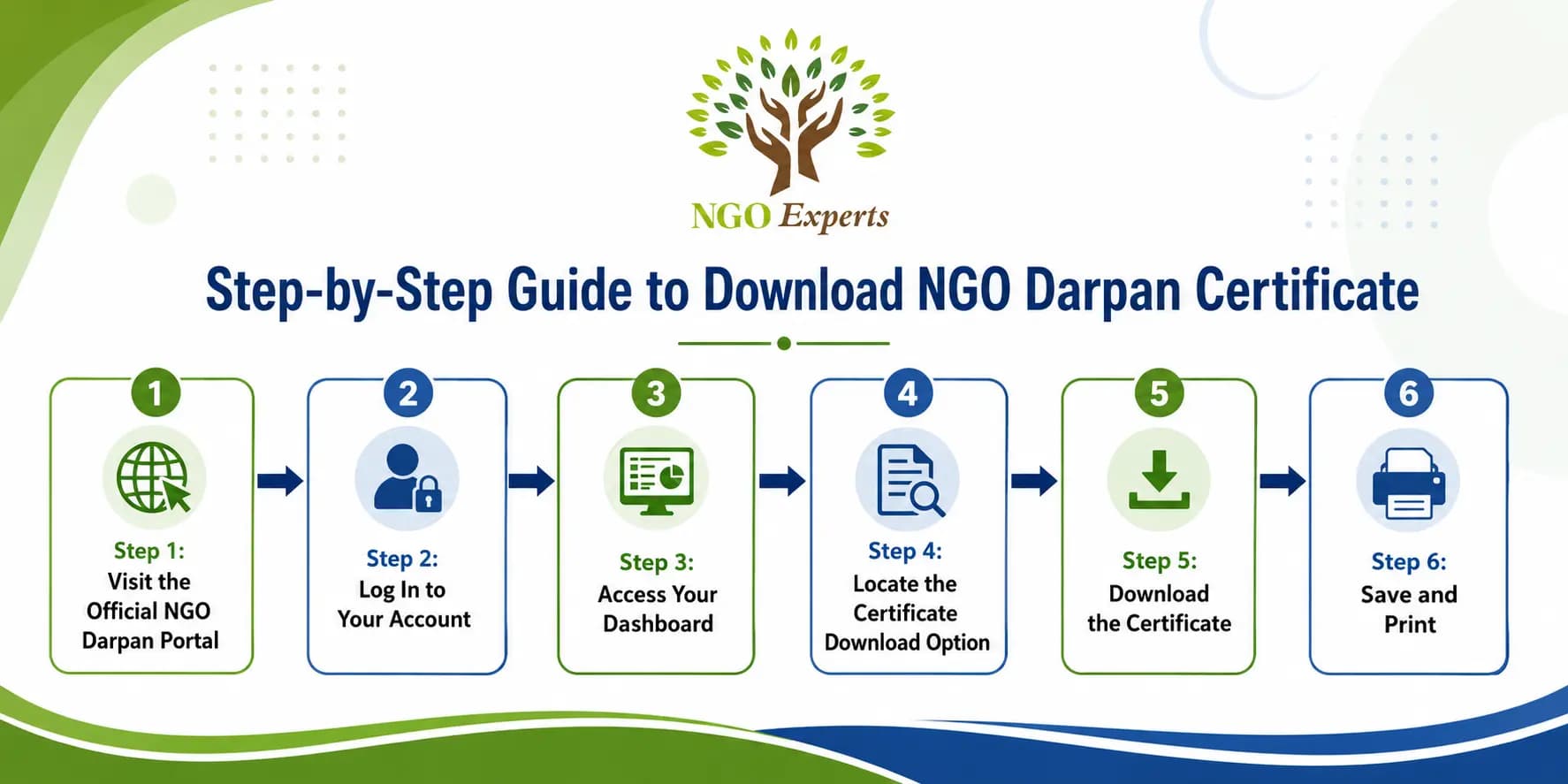
Step 1: Visit the Official NGO Darpan Portal
Before You Can Download the NGO Darpan Certificate
Only legally registered NGOs can apply for and download an NGO Darpan Certificate. If your NGO is not yet registered, you must first complete Section 8 Company Registration, Trust Registration, or Society Registration. Our experts handle the entire registration process online
Step 2: Log In to Your Account
Step 3: Access Your Dashboard
Step 4: Locate the Certificate Download Option
Step 5: Download the Certificate
Step 6: Save and Print
Documents needed for Download NGO Darpan Certificate
| Required Information | Purpose |
| Registered Email & Password | To log in to the NGO Darpan portal |
| NGO Registration Number | For validation and profile access, if required |
| Valid Registration Certificate | To ensure your NGO profile on the portal is approved |
Quick Checklist Before Downloading
- Have completed and approved your NGO Darpan registration.
- Ensure your profile details (address, PAN, office bearers) are fully updated.
- Login credentials (email and password) are active and accessible.
- Certificate download option is visible on your dashboard.
- Download and save both digital and printed copies.
Quick Tips
- Keep your documents and profile details up-to-date on the portal for smooth approval.
- If the download option is greyed out, wait 24 to 48 hours after profile approval or contact portal support.
- Contact support@ngodarpan.gov.in if you face issues with login or certificate availability.
- Regularly update your NGO profile to avoid compliance issues that might block certificate access.
Frequently Asked Questions
What is NGO Darpan Certificate?
Who can download the NGO Darpan certificate?
Is the NGO Darpan registration free?
What if I can’t find the download option?
How long does it take to get the NGO Darpan certificate after registration?
Can the certificate be used for government grants and CSR projects?
Author
I am a Content Specialist holding a Master’s degree and with over 5 years of experience in the creative arena. I specialize in breaking down complex concepts into clear, understandable insights that help my viewers deeply engage and retain. Known for my approachable and engaging style, I am committed to providing accurate, trustworthy information that empowers individuals and organizations to make informed decisions and achieve their goals.
Written by Srijita Chatterjee. Last updated on August 6, 2026