

Section 8 Company Registration in Karnataka
Registering a Section 8 company in Karnataka is a high-authority move. Karnataka, particularly Bengaluru, is India's tech and innovation hub, offering a unique ecosystem where social impact intersects with corporate efficiency.
By Aabha GargLast updated:
High Credibility for Corporate Partnerships (Bengaluru Focus)
Tax Advantages & 80G/12A Registration
Alignment with Karnataka State Government Initiatives
The Registrar of Companies (ROC) in Bengaluru is proactive, ensuring faster processing
Quick Answer
Want to establish a Section 8 Company in Karnataka but are unsure if it is the right legal structure for you? We can assure you that registering a Section 8 Company in Karnataka in 2026 is an excellent choice for individuals and groups aiming to create a sustainable non-profit organisation. It offers distinct advantages, such as separate legal identity, limited liability and simplified access to tax exemptions and CSR funds, compared to traditional NGOs or Trusts. This comprehensive guide outlines everything from the definition and eligibility to the exact step-by-step registration process on the MCA portal, ensuring you achieve your aim successfully.
Definition of Section 8 Company in Karnataka
Features of Section 8 Companies
- Non-Profit Motive: The cornerstone of its existence.
- Restricted Object: Can only operate with a valid object clause approved by the Central Government Ministry of Corporate Affairs (MCA).
- Licensed by the Central Government: Unlike other companies, it requires a specific license to incorporate under this section.
- Prohibition on Dividends: Members do not receive any profit share.
- Similar to a Private/Public Company: Structurally, it functions much like a private or public limited company, with directors and shareholders (members).
- "Limited" is optional: it does not have the words "Limited" or "Private Limited" after its name. Instead, its names often end with "Foundation," "Council," "Association," "Institute," "Federation," or "Chambers."
Difference between Trust, Society, and Section 8 Company
| Feature | Trust | Society | Section 8 Company |
| Governing Law | Indian Trusts Act, 1882 (and state laws) | Societies Registration Act, 1860 (and state laws) | Companies Act, 2013 |
| Formation Basis | A person sets aside assets for the benefit of a third party. | A group of 7 or more persons associated for social welfare, charity, etc. | Incorporation of a company under the Companies Act for a non-profit. |
| Entity Type | A creation of a private arrangement. | An association of individuals. | A separate legal entity from its members. |
| Management | Board of Trustees | Governing Body/Executive Committee | Board of Directors |
| Operational Ease | Flexible, with fewer compliances than a company. | Moderate compliance often requires state-level approvals. | Structurally formal with higher and often more transparent compliance. |
| Perception/Credibility | Perceived as less formal or easier to manipulate. | Perceived as better than Trust, widely accepted. | Highest credibility among donors and corporate partners. |
Process of Section 8 Company Registration in Karnataka
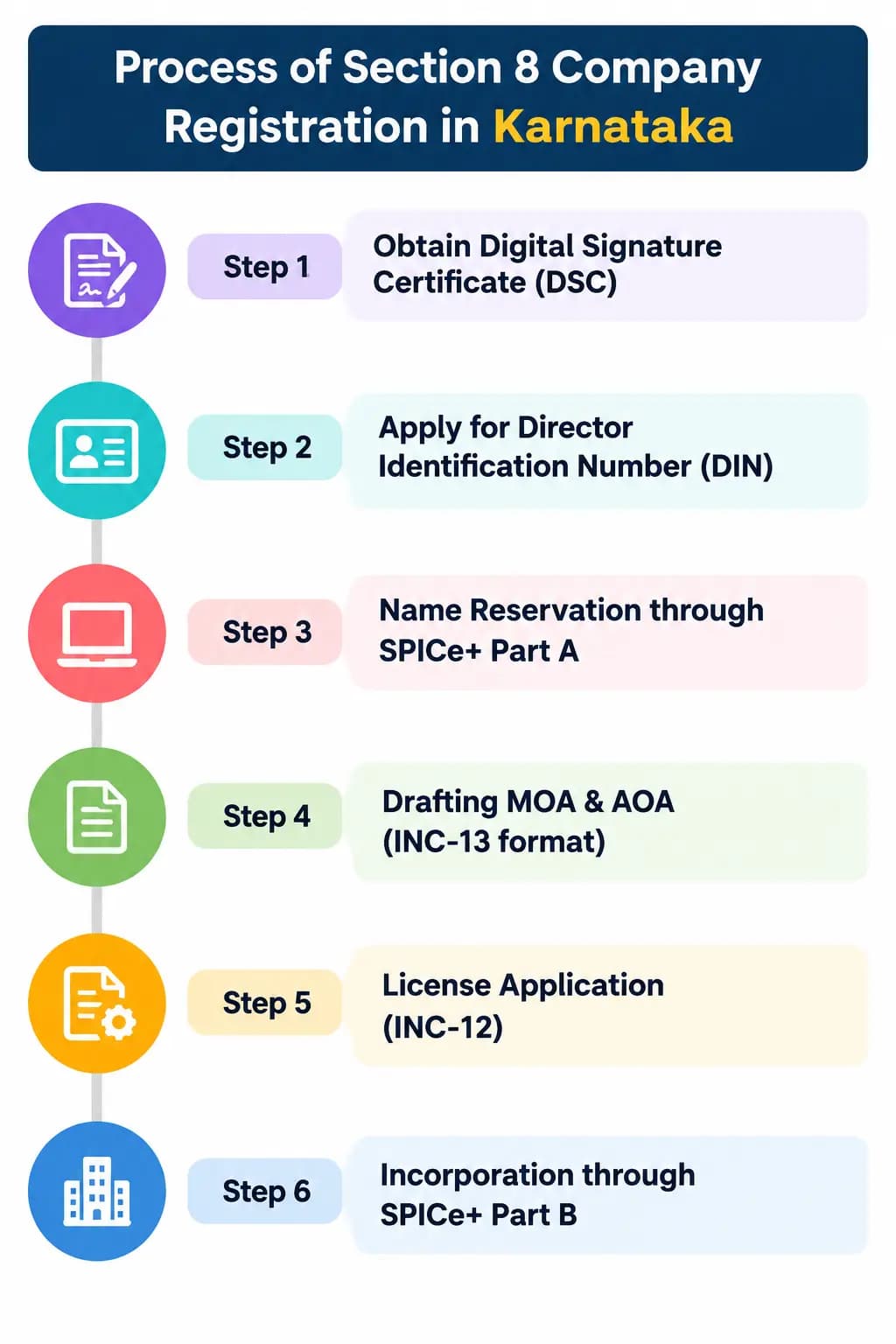
Step 1: Obtain Digital Signature Certificate (DSC)
Step 2: Apply for Director Identification Number (DIN)
Step 3: Name Reservation through SPICe+ Part A
- Use the SPICe+ Part A web form on the MCA portal to reserve your desired name.
- You must suggest at least two distinct names in order of preference.
- The name should reflect the non-profit nature (often using terms like Foundation, Council, Association, etc.).
- MCA will check the availability and approve one name (or reject all, requiring resubmission). The approved name is reserved for 20 days.
Step 4: Drafting MOA & AOA (INC-13 format)
Step 5: Section 8 License and Incorporation through SPICe+
Benefits of Section 8 Company Registration in Karnataka
Tax Exemptions and Credibility
- Credibility: This is the biggest asset. Having the MCA stamp of approval after a rigorous check signifies transparency and builds immense trust with potential donors, grant givers and the public.
- Income-Tax Registration and Donor Benefits: Incorporation as a Section 8 Company does not automatically grant income-tax exemption or donor deduction benefits. Eligible organisations may apply for the applicable registration under Section 332 and approval under Section 354 of the Income-tax Act, 2025, corresponding broadly to the earlier Section 12A/12AA/12AB and Section 80G framework. Approval and tax benefits are subject to the applicable statutory conditions.
- Potential CSR Funding Eligibility: A Section 8 Company may qualify to undertake CSR activities or receive CSR funding, subject to the Companies Act, 2013, the applicable CSR Rules, eligibility conditions and any relevant implementing-agency requirements. Incorporation alone does not guarantee CSR funding.
Limited Liability Protection
No Minimum Capital Requirement
Eligibility for CSR Funding
Eligibility Criteria for Section 8 Company Registration in Karnataka
Minimum Number of Directors and Members
- Minimum Members: At least two members (shareholders) are needed to incorporate the company.
- Minimum Directors:
- For a private limited Section 8 company: Two directors.
- For a public limited Section 8 company: Three directors.
Objective Requirements
- Science, Commerce, Arts, Research
- Education, Sports, Social Welfare
- Charity
- Protection of the Environment
- Or any other such useful object.
Documents Required for Section 8 Company Registration in Karnataka
Identity and Address Proof
- Identity Proof: Self-attested PAN card (mandatory for Indian nationals). Foreign nationals can provide a valid passport.
- Address Proof: Self-attested Aadhar Card, Voter ID, Passport, or Driver's License. Must be a valid and recent document.
- Passport-Size Photograph: Recent color photograph.
Registered Office Proof
- If Rented/Leased Property:
- Recent utility bill (Electricity/Gas/Water bill, or Water) in the owner's name, no older than 2 months.
- Rent Agreement or Lease Deed.
- No Objection Certificate (NOC) from the landlord (property owner) stating they have no objection to the premises being used as the company's registered office.
- If Self-Owned Property:
- Utility bill in the owner's name.
- Proof of ownership (like the latest sale deed or property tax receipt).
MOA & AOA Draft
- Draft Memorandum of Association (MOA): Outlines the objectives, scope of activities, and basic structure of the non-profit (incorporating the restrictive Section 8 non-profit clause).
- Draft Articles of Association (AOA): Defines the internal management rules, operational procedures, and power structure of the company.
DSC and DIN Requirements
- Digital Signature Certificate (DSC): At least one proposed director must have a Class 3 Digital Signature Certificate to sign the application forms electronically.
- Director Identification Number (DIN): This will be generated during the incorporation process for the proposed directors. However, if any director already holds a valid DIN (from being a director in another company), they must provide it.
Post-Registration Tax Compliance for a Section 8 Company
- Section 332: Provides the applicable registration framework for eligible non-profit organisations under the Income-tax Act, 2025, corresponding broadly to the earlier Section 12A/12AA/12AB framework.
- Section 354: Covers the relevant approval framework for eligible donation-related deductions, corresponding broadly to the earlier Section 80G framework.
- Application forms: The applicable route depends on whether provisional or regular registration or approval is sought. The Income Tax Department identifies Form 104 for specified provisional applications and Form 105 for specified regular-registration or approval applications. Check the current form instructions and eligibility conditions before filing.
- Tax treatment: Registration does not automatically exempt every receipt from tax. The organisation must satisfy the relevant statutory conditions and ongoing compliance requirements.
Why choose NGOExperts for Sec 8 company registration in Karnataka?
- Specialized NGO Expertise: NGOExperts excels in Section 8 registrations tailored for the Karnataka ROC, handling DINs, DSCs, name approvals, and MCA filings seamlessly.
- Full Compliance Support: Guides 12A, 80G exemptions, CSR eligibility, and post-registration like NGO Darpan, boosting funding credibility.
- Guidance Throughout Incorporation: NGOExperts helps prepare constitutional documents, application details, and MCA filings. The processing time depends on document readiness, name availability, application requirements, and MCA review; approval timelines cannot be guaranteed.
- Trusted Track Record: Proven nationwide success, higher donor trust, perpetual succession, and limited liability for scalable non-profits.
About the Author

A Content Strategist at NGOExperts, who focuses on NGO registration, 12A and 80G registration, FCRA compliance, income tax filing for non-profits, and CSR funding guidelines in India. I research and write our compliance guides in collaboration with our in-house Chartered Accountants and Company Secretaries, so every article reflects current tax and regulatory requirements for the NGO and non-profit sector.
Written by Aabha Garg. Last updated on Oct 13, 2026, 11:34 AM